


















Fuser Unit Maintenance: How Often to Service It, and the Sign-by-Sign Rules for Deciding When to Replace
Fuser Unit Maintenance: How Often to Service It, and the Sign-by-Sign Rules for Deciding When to Replace
 2026-12-21
 6


A fuser unit almost never dies without warning. It announces its decline for weeks — a faint smudge here, a page that curls at the edge there — and how long that warning period lasts depends entirely on whether anyone is reading it. Serviced on the right rhythm, a fuser unit will run out its full design life and then some. Left alone, it converts a cheap wear part into an expensive repair and, occasionally, a scorched machine.
The confusion is understandable. The fuser unit is a sealed, hot, hard-to-see assembly, and most people only think about it when something visibly goes wrong. But the maintenance logic underneath is simple: a handful of parts inside it wear on different clocks, and each one gives a specific signal before it goes.
This guide covers the two questions that actually matter — how often to service the unit, and how to decide when a part is finished — in the order you would meet them in the field.

What Is Actually Inside a Fuser Unit
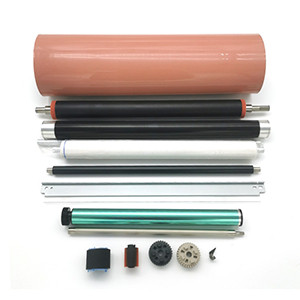
A fuser unit is not one part. It is a small assembly of components, and each wears at its own rate. Knowing which is which is the difference between replacing a sleeve for a few dollars and replacing a unit for a few hundred.
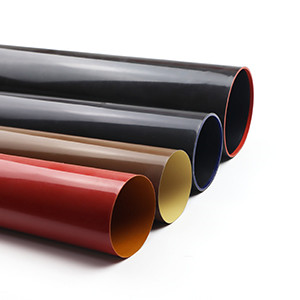
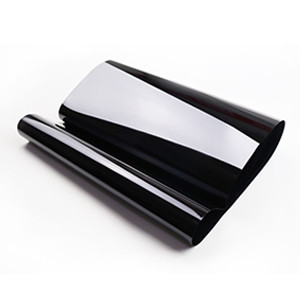
Fuser film sleeve / belt:Applies heat to melt toner into the paper. On light duty these are good for roughly 50,000–100,000 pages, and considerably less on high-volume colour machines. When it goes, the page smudges, toner rubs off under a thumb, and glossy streaks appear.
Upper fuser roller:The heated roller in roller-type designs, rather than sleeve-type. Typically rated to around 80,000 pages. Failure shows as marks repeating at the roller's circumference.
Pressure roller. Applies the nip force that presses softened toner into the sheet. Rated for roughly 80,000–100,000 pages. A worn one fuses unevenly and creases or wrinkles the paper at the edges.
Separation claws: Peel the sheet off the hot roller before it wraps. Normally replaced together with the sleeve or roller rather than on their own. When they wear, jams cluster at the fuser exit and paper wraps around the roller.
Cleaning roller / web:Wipes residue off the hot surface. This is a cleaning item rather than a replacement part — run it about every 10,000 pages. Neglected, it lets the surface glaze over and the page picks up background contamination and ghosting.
Thermistor / thermostat:Reads and limits the fusing temperature. Check on every service, not on a page count. A faulty one produces error codes and fusing that runs either cold or overheated.
Bushings and bearings: Let the rollers turn freely. Inspect at every roller change. A dry or flat-spotted one squeals, drags, and wears the rollers unevenly.
Two things stand out here:First, the wearing parts fail at different times, so treating the fuser as a single disposable unit means throwing away good components. Second, the cheap parts kill the expensive ones: a worn separation claw scoring the sleeve, or a dry bushing making a roller drag, does far more damage than the cost of the small part that caused it.
The Three Clocks That Set Your Maintenance Schedule
There is no single "correct" service interval, because a fuser ages on three clocks at once. Whichever runs out first is your schedule.
The page counter. The most predictable clock. Industry figures commonly put a fuser unit's design life at roughly 50,000–100,000 pages, with the heated roller and pressure roller typically rated around 80,000 pages. This is the number to plan stock around.
The calendar. A fuser that sits idle still ages — lubricant migrates, coatings oxidise, and rollers flat-spot under constant pressure. A machine printing 2,000 pages a month needs attention on a longer, time-based rhythm rather than a page-based one.
The duty profile. The clock that surprises people. Heavy stock runs hotter than plain paper, continuous high-coverage colour work holds the rollers at temperature for longer, and both accelerate coating ageing well beyond what the page count suggests. A machine advertising 40,000 pages a month and a machine printing 500 pages a month do not wear their fusers at a ratio of 80 to 1.
As a working rule, a service schedule built around monthly volume holds up well in practice: light office machines receiving periodic deep servicing, and production machines on a much shorter cycle — with the exact figures taken from the manufacturer's manual, not from a generic chart. What matters is that the schedule is set by the fastest clock, not the most convenient one.
What Servicing Actually Involves
Servicing a fuser is less about replacement and more about inspection and cleaning. Five things, every time:
● Clean the hot surface. Most machines have a built-in cleaning page or cleaning mode that wipes residual toner off the fuser surface — run it roughly every 10,000 pages rather than waiting for a symptom. Caked-on toner that hardens into glaze produces ghosting and background contamination long before the part is genuinely worn out.
● Inspect and clean the separation claws. They sit in permanent contact with the hot surface, so any debris baked onto a claw is grinding against the sleeve or roller every single revolution. A dirty claw is one of the fastest ways to destroy a healthy sleeve.
● Check the bushings and bearings. Spin the rollers by hand. Any drag, squeal or flat spot means friction, and friction means heat and uneven wear elsewhere. A few cents of lubricant here protects a part costing many times more.
● Check the thermistor and thermostat. Verify the temperature reading is plausible, not just present. An out-of-range thermistor causes fusing faults that look exactly like a worn part, and it is the one item on the list that can also be a safety issue.
● Log the page count against the last service. The counter is the only clock you can actually read, so record it. A part that fails far earlier than its rating tells you something about the duty profile, the paper, or the toner — and that is worth knowing before the next one fails the same way.
Deciding When to Replace: Four Levels, Not One Decision
The mistake is treating replacement as a single yes-or-no call. In practice there are four levels, and the correct action is usually the cheapest one that clears the symptom.
Level 1 — observe and confirm. A single smudge on one job is not a worn part. Print a test page on fresh paper of the correct weight before touching anything. Damp paper, wrong media settings and a low toner cartridge all mimic fuser faults, and none of them requires a repair.
Level 2 — clean and re-test. If the symptom is background contamination, ghosting or a repeat mark, run the cleaning cycle and inspect the claws before ordering parts. Glaze and baked-on debris are recoverable, and cleaning costs nothing.
Level 3 — replace the single worn part. This is where most genuine fuser failures belong. The symptoms are specific:
● Toner that smears or rubs off under a thumb — the sleeve or release surface is finished.
● Marks repeating at a fixed interval — measure the spacing; if it matches a roller's circumference, that roller is damaged, and cleaning will not fix it.
● Jams that always stop in the same place, at the fuser exit or wrapped around the roller — worn claws, a dragging bushing or a flat-spotted pressure roller.
● Paper curling, creasing or going wavy at the edges — uneven nip pressure from a worn pressure roller.
● Squealing or grinding from the fuser — a dry or flat-spotted bearing.
Level 4 — replace the unit. Reserved for genuine mechanical failure: a scored or torn sleeve that cannot be separated from a damaged roller, a warped frame, a cracked housing, or a machine where the internal parts are not individually supplied. If you find yourself at Level 3 on three components at once, the economics of a unit swap start to make sense — which is the next question.
The Arithmetic of Repairing Versus Replacing the Unit
Replacing a complete fuser unit typically costs several times what the individual wear parts cost, and on most machines the wear parts are what actually failed. A sleeve, a set of claws and a bushing will restore a unit that a new assembly would also have fixed, for a fraction of the price.
Three situations tip the balance the other way:
● The failure is structural, not wear-based — a bent frame or cracked housing cannot be fixed by swapping consumables.
● Access cost dominates. On some models, reaching the fuser takes long enough that repeating the job in a month costs more in labour than the price difference.
● The machine is near end of life. If the fuser is one of several systems about to fail, a unit swap only postpones the decision.
For everything else, the pattern in the field is consistent: replace the part that failed, inspect its neighbours while the unit is open, and note the page count.
Decoding the Error Codes
Modern machines usually name the failing system directly, which shortens diagnosis considerably.
● Fuser temperature errors — a code indicating abnormal fusing temperature (Ricoh machines, for example, report SC542) points at the thermistor, the heater or the power supply to the fuser, rather than at the sleeve.
● Subsystem error blocks — codes such as "internal error 03.xxx" on HP machines typically flag a temperature sensor fault, a failed heater lamp, or a fuser unit not seated correctly.
● Overheat warnings — almost always traceable to a thermostat or thermistor issue, and worth treating as a safety matter rather than a print-quality one.
A code tells you which system to open. It never tells you which part inside is worn — that still comes from the symptom list above.
Recommended TMS Fuser Parts
TMS treats fuser components as a product line in their own right, matched to specific model groups rather than sold on a "close enough" basis. Seven widely requested units, covering five brands:
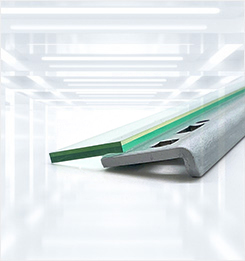
Konica Minolta BH 654 Fuser Film Sleeve — TMS5022G
Cross-references A2X0R71011 and A2XKR71033. Covers bizhub 654, 754, 654e, 754e, C654, C754, C654e, C754e, 554e, C554, C554e, C558, C658, 558, 558e, 658e, 758 and 808 — one part number across two generations of both mono and colour platforms.
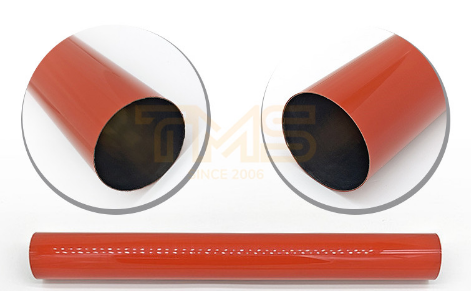
Konica Minolta BH C558 Fuser Film Sleeve — TMS5206G
Built for the colour bizhub C558, C658, C758, C808, C659 and C759 series — machines that run hotter and harder than the mono units beside them, and where sleeve wear shows up as visible rub-off on every job.
Kyocera 3050ci Fuser Film Sleeve — TMS5193G
Fits the Kyocera TASKalfa 3050ci, 3550ci, 3051ci, 3551ci, 4550ci, 5550ci, 4551ci and 5551ci.
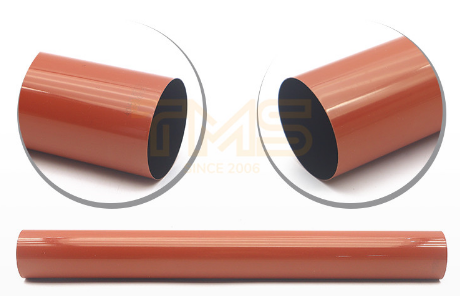
Sharp BP-50M26 Fuser Film Sleeve — TMS5197G
Cross-references BP-FB703 and covers an unusually wide Sharp range — BP-50M26 through BP-70M65, BP-50C26 through BP-70C65, plus BP-M4552R, BP-5552R, BP-6552R, BP-M4582D, BP-5582D, BP-6582D and BP-C2652R through BP-C6582D.
Toshiba 2505AC Fuser Film Sleeve — TMS5160G
Cross-references BT-FC505-Film, BT-FC505H-Film, 6LJ58937000, 6LJ590000 and 6LK522780. Fits e-STUDIO 2505AC through 5005AC, 2515AC through 5015AC, and the 2555C to 5055C colour series.
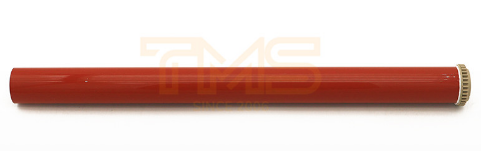
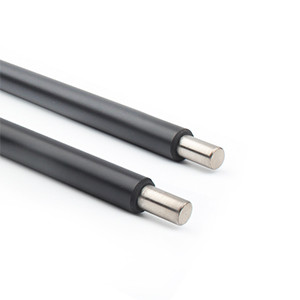
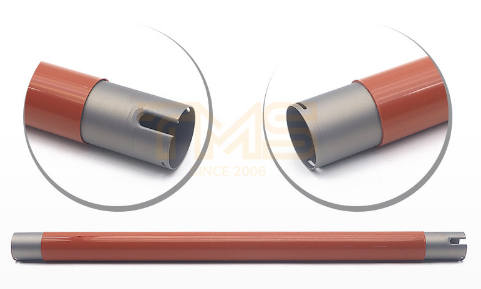
Xerox WorkCentre 7425 Upper Fuser Roller — TMS7162G
For roller-type fusers rather than sleeve-type. Covers WorkCentre 7425, 7428 and 7435, plus Phaser 7500, 7500DN, 7500DT, 7800, 7800DN and 7800DT — the correct part when the repeat marks match the upper roller's circumference.
How TMS Supports the Diagnosis, Not Just the Sale
Fuser work lives or dies on knowing which part you are looking at, and that is where most aftermarket suppliers leave buyers on their own. TMS takes the opposite approach: every part number ships with the information needed to fit and judge it — the full model compatibility list so you confirm the match before ordering, the installation and handling notes that matter on a hot assembly, and a fault-symptom reference that maps what the page shows back to the component responsible.
That last point is what turns a parts order into a diagnosis. A technician holding a sleeve with repeat marks at 76 mm does not need to guess whether the problem is the sleeve or the pressure roller — the mapping is in the documentation, not in a support queue. For buyers assembling a larger job, parts can also be combined around a fault scenario: sleeve, claws and bushing in one order for a unit due for a full refresh, rather than three separate purchases and three separate waits.
Behind that is a range built for machines that are genuinely still working — the same sleeve and roller specifications held batch to batch, and coverage that runs from current platforms back to legacy models most suppliers have quietly dropped, across Ricoh, Canon, Xerox, Kyocera, Konica Minolta, Sharp, Toshiba, HP, Brother, Samsung, Lexmark and Epson. A fuser part whose specification drifts will not hold its rated life in any climate, which is the whole argument for buying on part number rather than on price.


